Run Claude Code agents in parallel with git worktrees
Two agents in one folder overwrite each other's files. One git worktree per task gives each agent its own copy of the repo on its own branch. How to set it up, and the traps that catch most people.
On this page
What Claude Code gives you (as of 14 October 2026)Fixes and stepsWith ratchetRelated guidesWhat Claude Code gives you (as of 14 October 2026)
claude --worktree. Worktree support is built in:claude --worktree feature-authcreates a worktree under.claude/worktrees/feature-auth/on its own branch and starts Claude there. Run it again with another name in a second terminal for a parallel session.claude --worktree "#1234"starts from a pull request.- Ignored files. List files git ignores, like
.env, in.worktreeincludeand Claude Code copies them into each new worktree. - Agent view. In agent view (a research preview), Claude moves a session into its own worktree before it edits files. Deleting the session removes its worktree, including uncommitted changes.
Fixes and steps
The Claude Code parts follow Anthropic's worktree docs and agent view docs as of 14 October 2026; the rest is plain git.
- Install dependencies in each worktree. A new worktree is a fresh checkout: no
node_modules, no build output. Run your install step in it before the agent runs tests. - Copy
.envand other ignored files. Add them to.worktreeinclude, or copy them by hand. Otherwise the app in the worktree starts without its settings. - One branch per worktree. git won't check out the same branch in two worktrees. Give each task its own branch.
- Clean up.
git worktree listshows every worktree;git worktree remove <path>removes one;git worktree pruneforgets folders you already deleted. Check for uncommitted work first. - Watch the quota. Anthropic notes that ten agents in parallel use quota roughly ten times as fast.
With ratchet
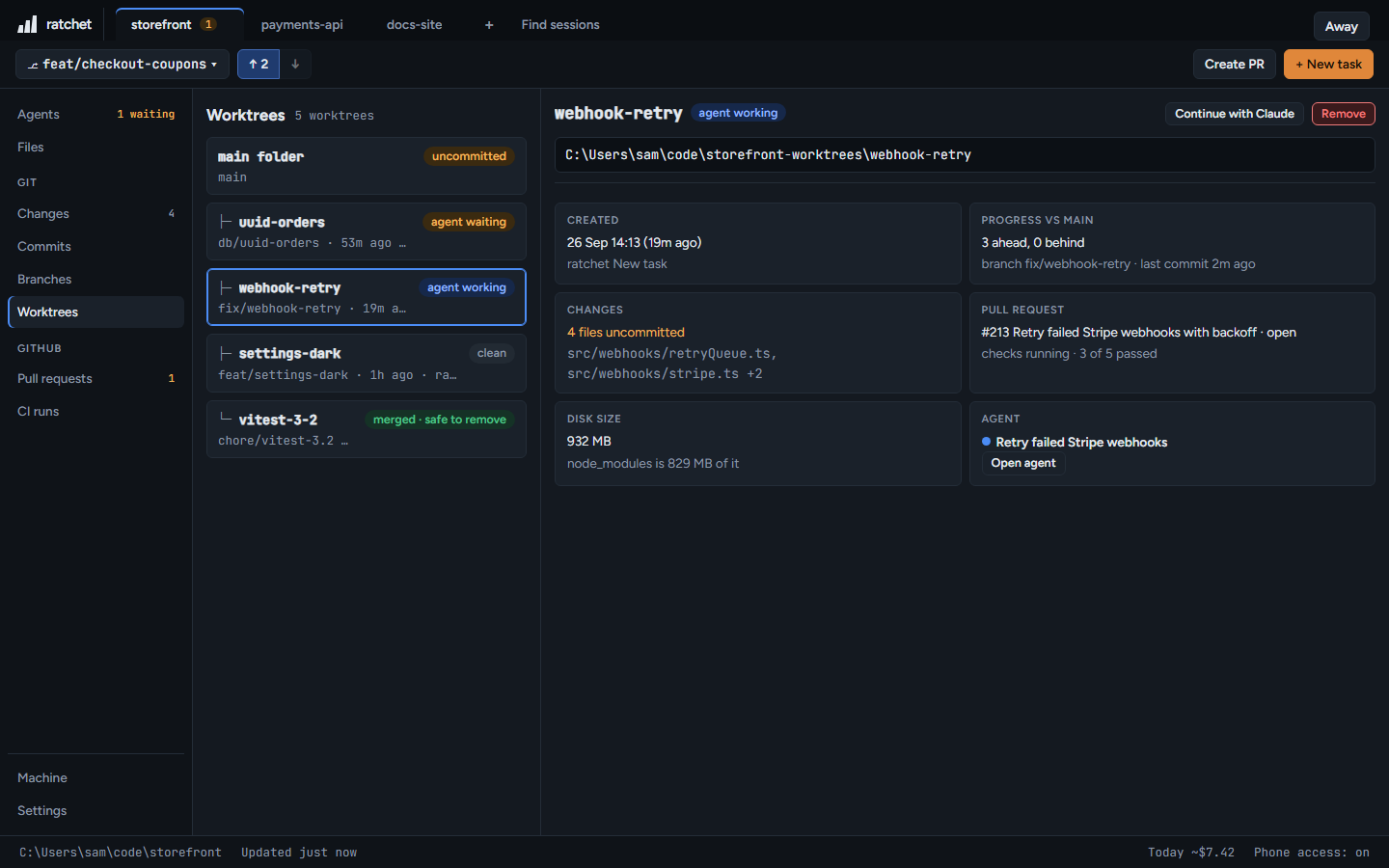
ratchet is a free dashboard for Claude Code that runs on your PC, on Windows 10, Windows 11 or macOS. It starts each task in its own worktree and shows what is in every one.
npm install -g @ratchet-ai/ratchet ratchet
- Press + New task and name it, for example login timeout. ratchet creates the branch
feat/login-timeoutand a worktree folder next to the repo, can copy your.envfiles into it, and starts Claude Code there. See New task. - Open Worktrees to see the agent in each folder, its progress, its pull request and its disk size.
- When the work is done, open the pull request from ratchet and watch its checks. See Create a pull request.
- Press Remove to delete a finished worktree. The branch stays, and ratchet refuses while the worktree has uncommitted changes or an agent is working in it. See Remove a worktree.